
An AI meeting assistant that joins the call
Anthropic launches Claude Meetings in beta: AI joins the video call, takes notes and logs tasks. What a small business should decide before inviting it.

Blog · · 6 min · digizone team
An AI meeting assistant can now sit in on your video call: Anthropic has launched Claude Meetings in beta, which joins the call as another participant, takes notes, logs tasks and drafts documents while you talk. For a small company, the useful question is which meetings you let it into, and how you make sure what was agreed actually happens afterwards.
In short
- Anthropic has launched Claude Meetings in beta, an AI meeting assistant that joins the video call as another participant and leaves notes, a transcript and tasks.
- For now it only works with Google Meet and on Claude's Team and Enterprise plans, according to TechCrunch and Anthropic itself.
- The AI announces that it is on the call and, by default, stays out of meetings with outside guests; Anthropic asks users to make sure everyone is happy to be transcribed.
- For a small business, the useful move is to pick one internal meeting, tell the team, and check every week whether the logged tasks have an owner and get done.
What Claude Meetings is
According to TechCrunch, which reported it on 10 November, Claude Meetings adds Claude to video calls as a visible participant. It follows the conversation and works during the meeting: it can draft the plan being discussed, map out a timeline on a whiteboard, answer questions in the chat and pull information from the work apps you have connected. Once you hang up, the notes, tasks and anything it has prepared stay in claude.ai.
There is small print. It is rolling out in beta, only on the Team and Enterprise plans, and for now it only works with Google Meet; Anthropic says other platforms are coming soon. In its announcement, Anthropic explains that when Claude joins, it appears as a participant and posts a notice in the call's chat, that it answers in writing by default, and that it saves a transcript, a summary and descriptions of what is shared on screen, but not the audio.
Be careful with outside guests. By default, Claude stays out of meetings with people from outside the organisation and leaves if one of them joins; an admin can change this. And Anthropic advises making sure everyone on the call is OK with being transcribed.
Lourdes's Monday
Imagine Lourdes runs a catering company with three coordinators. Every Monday at nine they get on a video call and go through the week's events: a First Communion on Friday, a wedding on Saturday, a company lunch on Sunday. They talk fast, everyone agrees, and each of them jots down their bit wherever they can, in a notebook or on a whiteboard in the kitchen.
At the meeting, someone mentioned that the wedding venue would not be setting out the chairs and that somebody needed to ring and confirm. Everyone heard it. Nobody wrote it down as theirs.
Why do agreements get lost when the call ends?
Because in a small company the meeting is also the moment when everyone is juggling a dozen things. Whoever is leading does the talking, whoever is listening is already thinking about the next order, and nobody has the job of taking the minutes. What was decided lives in each person's memory, and each memory keeps a slightly different version.
As Anthropic puts it, according to TechCrunch: “The work that comes out of a meeting usually starts after everyone hangs up.” That handover, from conversation to task, is exactly where anything nobody has claimed falls through the cracks.
A Saturday without chairs

On Saturday morning, Lourdes arrives at the venue to find the tables dressed and the chairs stacked in a corner. Nobody rang. Now she has to set out well over a hundred chairs with the front-of-house team, who should have been on the canapés. The wedding goes ahead, but it is a scramble and service runs late.
A slip like that costs more than one stressful morning. It costs unplanned staff hours, a client who senses something was not quite right, and an argument the following Monday about whose job it was. And the answer is nearly always the same: nobody's, because it was never said.
How can you use an AI assistant in your team's meetings?
The technology can already write the notes and tasks for you. What it cannot do on its own is decide who takes care of each one. If your team works on Google Meet and has a Claude Team or Enterprise plan, these steps will help you try it sensibly:
- Pick one recurring internal meeting, with no clients or suppliers, and start with that one only.
- Tell the team beforehand: what will be transcribed, where it is stored and who can read it. Make sure everyone is happy with it.
- At the end of each meeting, have the logged tasks read out, each with a name next to it.
- Go through the list at the start of the next meeting: what got done, what did not, and why.
- Write down which meetings stay assistant-free, such as those about pay, health or disagreements within the team.

For Lourdes, the call to the venue would have been written down as a task. Read out at the end, someone would have said “I'll do it”. That small moment is what the AI brings into view, and what the team has to close.
From conversation to document, in your business
Before suggesting any tool, we get to know how your business works: what each meeting covers, which documents come out of it and who uses them afterwards. Once that is clear, we design and build the automation or bespoke application that gets information to the people who need it, instead of leaving it on a call.
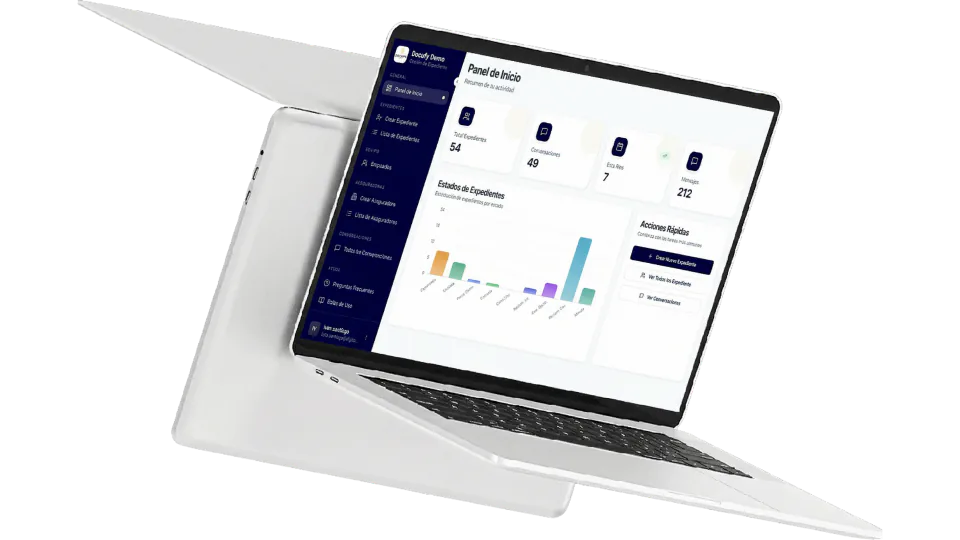
What it shares with Docufy is turning information into documents without retyping it. Docufy Legal is a platform for law firms handling road traffic accident claims before they reach court, where gathering paperwork and drafting documents took up much of their time. For those firms we built a platform where AI prepares the documents from the case information, using each firm's own templates; what its users highlight most is the time they gain when pulling the paperwork together.
One meeting for a month
There is no need to change every meeting at once. For Lourdes, if her team meets on Google Meet and has a Team or Enterprise plan, the first version would be the Monday meeting, with the assistant in it and the task list reviewed every week for a month. If after four Mondays not a single call has been missed, she knows what works and can decide whether to bring it into other meetings or link it to the way she organises events.
If you would like to see how it would work for you, we walk you through it step by step (in Spanish).
Frequently asked questions
What is Claude Meetings?
It is a Claude feature from Anthropic, currently in beta. Claude joins a video call as a visible participant, follows the conversation, answers questions in the chat, drafts documents or whiteboards during the meeting and leaves notes, a transcript and tasks in claude.ai afterwards. By default it answers in writing and saves the transcript and a summary, not the audio.
Which video call apps does Claude Meetings work with?
For now, only Google Meet. Anthropic says other platforms are coming soon but has not given dates. During the beta it is also only available on Claude's Team and Enterprise plans, and it is not offered to some organisations with special privacy or encryption set-ups, such as those using zero data retention.
Do you need to tell people if AI is transcribing the meeting?
According to Anthropic, when Claude joins the call it appears as a participant and posts a notice in the chat. Even so, Anthropic itself recommends making sure everyone on the call is OK with being transcribed. The sensible approach is to tell the team in advance, and explain where the transcript is kept and who can read it.
Can an AI assistant join meetings with clients?
With Claude Meetings, not by default: it stays out of calls with guests from outside the organisation and leaves if one of them joins. An admin can allow it. On those calls it posts its notice but does not reply in the chat, and what guests say is included in the notes and transcript.
Is transcribing a meeting enough to get tasks done?
No. The transcript records what was said and produces a task list, but someone still has to take ownership of each item. It works best when the tasks are read out at the end of the meeting, each with a name next to it, and reviewed at the start of the next one to see what got done and what did not.
Sources
About digizone
digizone is a custom software development company founded in 2019, with offices in Barcelona and Cartagena (Spain). We design and build mobile apps, web applications, CRM/ERP systems and AI automation for startups, SMEs and enterprises. Meet the team

Other articles
Don't get left behind: if you want to keep up to date with the fast-moving technology sector, take a look at the following articles:

Your business listing in ChatGPT: what changes for SMEs
OpenAI now lets businesses claim their ChatGPT listing, correct their details and see how often they are mentioned. What to check before customers ask.
Read more »
Building internal tools with AI: who gets to see what
Cursor now publishes the apps you describe behind a link, with a database and sign-in. What it means for a small firm and what to decide before adding client data.
Read more »
Integrate your app with Siri: what Siri AI changes
Apple has opened Siri AI to any developer's app. What changes, when it arrives, why the EU is still waiting and which tasks in your app to get ready first.
Read more »Contact us
Do you have any questions? Would you like to schedule a call or a meeting? We would be happy to address any concerns and start working with you. The perfect digital solution for your business is just around the corner.
Subscribe to the newsletter
Discover the digital future by subscribing to our exclusive newsletter! Stay updated on the latest trends and developments in the world of technology. Don't miss the chance to be the first to learn about the innovations that are transforming the present! Subscribe now.