
Building internal tools with AI: who gets to see what
Cursor now publishes the apps you describe behind a link, with a database and sign-in. What it means for a small firm and what to decide before adding client data.

Blog · · 6 min · digizone team
Building internal tools with AI no longer stops at a prototype on someone's laptop: since 5 November, Cursor publishes the apps you describe behind a link, with a database, sign-in and hosting included. For a small business, that brings the jobs board or order tracker it never got round to commissioning within reach. It also brings forward a decision a development team used to make: who sees what.
In short
- On 5 November 2026 Cursor launched Build Live Apps: you describe an app and its agent writes it, adds a database, sign-in and hosting, and publishes it behind a link.
- According to Cursor, apps go through automatic security checks before publishing, and the feature is on all its paid plans that include cloud agents.
- The New Stack notes that it is unclear how well those checks catch misconfigured permissions, and advises closer scrutiny if the app touches sensitive systems.
- Before you build an internal tool with AI, decide who will use it and what each person can see, and start without client data.
What Cursor's Build Live Apps does
Cursor, an AI coding platform, announced it in its changelog: you describe the app you want, one of its cloud agents writes it and, if needed, sets up a Postgres database, puts access behind Cursor sign-in and provisions hosting. When you publish, you pick the address and get a link. Its documentation mentions dashboards, portals and microsites among the uses, and each team or individual user gets its own hosting account, isolated from the rest.
Before anything is published, Cursor runs four fixed checks (exposed keys and credential files, among others) and an AI security review; nothing goes live until they pass and you choose to publish. Private and team apps require signing in to Cursor; on individual plans they can be opened to anyone with the link, while on team and enterprise plans that is switched off unless an admin turns it on. It is available on all paid plans that include cloud agents. The New Stack adds a caveat: it is unclear how reliably those checks catch misconfigured database permissions or access controls, and it advises closer scrutiny if the app connects to sensitive systems.
Nacho's jobs board

Imagine Nacho runs a renovation company with two crews. Every Monday he hands out the jobs by phone, notes missing materials in a spreadsheet and keeps progress photos on his mobile. On an ordinary Tuesday, one foreman turns up at a flat without the key and another buys tiles that were already on order.
That evening, Nacho describes what he needs: a list of jobs with the address, the crew, the materials still to come and progress photos. The next day he has a working link, leaves it open to anyone who has it and sends it to the group chat. It works so well that he forwards it to the plumber he subcontracts too. What he has not asked himself is what each person sees: the plumber logs in and finds every client's address and phone number, and where each key is collected.
Why does an internal tool grow without anyone thinking about access?
Because whoever builds it is thinking about the problem they want off their plate, not about who will log in. At first two trusted people use it and everything feels private. Then a new foreman arrives, a subcontractor, someone from the accountant's office, and the link gets passed around. Nobody decides to open it up. It just opens up.
Until now, a development team sat between the idea and the tool, asking about roles and permissions. With apps published straight from a description, that step gets shorter, and the person describing the app has to ask the question instead.
A link that reaches the wrong people

An internal tool tends to end up holding the most sensitive parts of a business: addresses, phone numbers, prices, sometimes how to get into a client's home. If everyone with the link sees the same thing, someone who only needed to know which job to go to can browse everyone's details. Fixing it later costs more: you have to take access away from people already using the app and, if it comes to it, explain to clients what happened. And if the data is personal, protecting it is still your company's responsibility, whoever wrote the code.
What should you decide before building your first internal tool?
The tool can come from a description; access is something you should decide yourself, with pen and paper, before you write a word of the brief.
- List who will use it: you, the office, each foreman, outside people. Next to each role, write what they need to see and what they do not.
- Start with test data or no client data at all, and add it once you know who has access.
- Share the app with named people, not through a public link. Go back to the list of who has access every so often.
- Ask in your description for each role to see only its own records, then check: sign in as a foreman and look at what comes up.
- If the app will connect to your invoicing software, your online shop or other company systems, have someone who knows security review it first.

With that list, the description you give the AI improves on its own: you are no longer asking for “a list of jobs”, but for a list of jobs where each foreman sees his own and the office sees them all.
Bespoke internal tools at digizone
At digizone we design and build bespoke internal tools, CRMs and ERPs so that everyone on the team works in the same place with what they need. We start with who uses the tool and what each person does with it, and from there we define roles, permissions and where the data is stored.
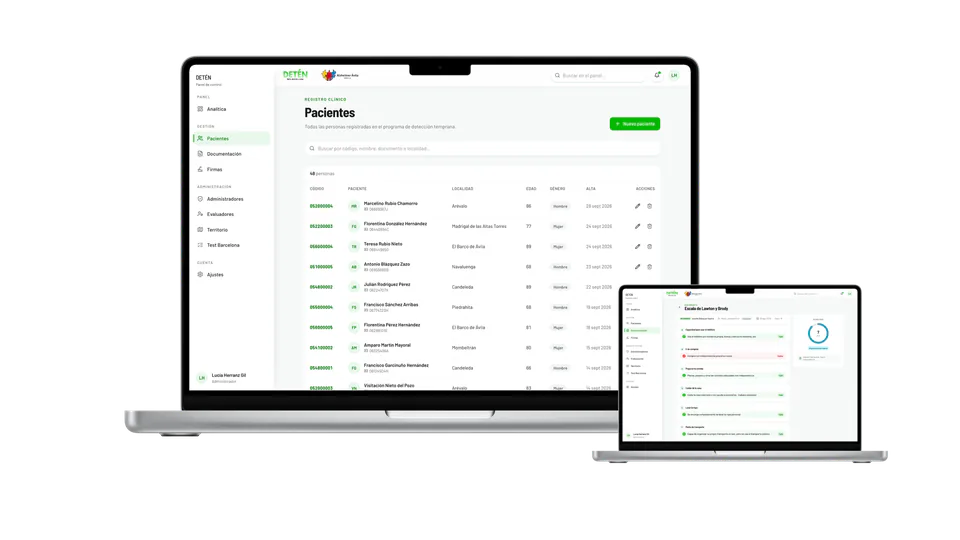
We saw this with DETÉN, the web application we built for Alzheimer Ávila's fieldwork in the villages of the province. It brings together each participant's record, the cognitive scales, the signed consent forms and the speech tests. Voice recordings are special-category biometric data, and the sensitive data sits in private storage with role-based access.
First, a jobs list for two foremen
Nacho did not need to give up on his board; he needed a smaller version of it. The first could be just the list of jobs for his two foremen, each seeing his own, with no client phone numbers and no keys. Once it is clear who logs in and what they see, the materials come next, then the photos and, last of all, the plumber's access to the jobs he works on. A tool that grows this way can be tried from day one without putting anything sensitive at stake.
If you would like to see how it would work for you, our free workshop, in Spanish, walks through it step by step.
Frequently asked questions
What is Cursor's Build Live Apps?
It is a feature Cursor launched on 5 November 2026. You describe the app you want and one of its cloud agents writes it, creates a database if needed, puts access behind Cursor sign-in and hosts it. After some security checks, you publish it and get a link. It is available on paid plans that include cloud agents.
Can I put client data into an internal app built with AI?
You can, but it is best to do so once you know who logs in and what each person sees. Cursor's automatic checks look for exposed keys and credentials, among other things; according to The New Stack, it is unclear whether they catch misconfigured permissions. Start with test data and get a review before connecting sensitive systems.
Who can open an app published with Cursor?
According to Cursor's documentation, private and team apps can only be opened by people signed in to Cursor who have been given access: named people, groups or the whole team. On individual plans they can be made public to anyone with the link; on team and enterprise plans that is switched off unless an admin enables it.
What do I need to decide before building an internal tool?
Who will use it, what each role needs to see and what data it will hold. Put it in a simple list: you, the office, the foremen, outside people. With that, you can ask for each role to see only its own records, share the tool with named people and check the permissions by signing in as each of them.
When does it make sense to bring in a development team?
When the tool will hold personal or sensitive data, connect to invoicing, your online shop or other systems, or be used by people outside the company. That is when roles, permissions and where the data is stored matter most, and a review by someone experienced gives you peace of mind before opening it to more people.
Sources
About digizone
digizone is a custom software development company founded in 2019, with offices in Barcelona and Cartagena (Spain). We design and build mobile apps, web applications, CRM/ERP systems and AI automation for startups, SMEs and enterprises. Meet the team

Other articles
Don't get left behind: if you want to keep up to date with the fast-moving technology sector, take a look at the following articles:

Integrate your app with Siri: what Siri AI changes
Apple has opened Siri AI to any developer's app. What changes, when it arrives, why the EU is still waiting and which tasks in your app to get ready first.
Read more »
Robots.txt for AI: decide if models train on your site
Google plans to honour a shared robots.txt signal in 2027 that says whether your site can be used to train AI. What changes and how to decide what to open up.
Read more »
AI training for employees: what holds small firms back
The Bank of Spain finds a lack of skilled staff is the biggest barrier to AI, yet few small firms plan to train their teams. How to start with the people you have.
Read more »Contact us
Do you have any questions? Would you like to schedule a call or a meeting? We would be happy to address any concerns and start working with you. The perfect digital solution for your business is just around the corner.
Subscribe to the newsletter
Discover the digital future by subscribing to our exclusive newsletter! Stay updated on the latest trends and developments in the world of technology. Don't miss the chance to be the first to learn about the innovations that are transforming the present! Subscribe now.