
AI for accounting: ChatGPT drafts and you approve
OpenAI has launched ChatGPT for Accounting to draft entries, reconcile the bank and close the month. First, decide what a person reviews and signs off.

Blog · · 6 min · digizone team
AI for accounting now has a product from OpenAI: ChatGPT for Accounting, launched on 18 November, drafts entries from invoices, matches bank transactions against the books and writes the month-end report inside accounting software such as QuickBooks or Xero. For a small business it can take hours of repetitive work off your plate, as long as a person reviews and approves what the AI suggests.
In short
- On 18 November OpenAI launched ChatGPT for Accounting, with its own plugin plus others from software such as QuickBooks, Xero and NetSuite, among others.
- According to OpenAI, it drafts entries from invoices and receipts, matches the bank against the books, looks for possible duplicates and writes month-end reports.
- OpenAI itself asks users to review the supporting records, calculations and suggested coding before approving any entry or report.
- The sensible start is read-only access, the supporting record next to every suggestion and a clear answer to who signs off.
What ChatGPT for Accounting is
According to Dataconomy, OpenAI introduced an accounting plugin for ChatGPT on 18 November, alongside plugins from partners. On its product page, OpenAI lists Intuit QuickBooks, Xero, NetSuite, BILL, FreshBooks, Rillet and Campfire among them. For software without a plugin, the company points to computer use, the feature that lets ChatGPT operate an application much as a person would.
OpenAI describes four jobs: drafting entries from invoices and receipts, gathering records from email, files and accounting software, checking workpapers for possible duplicates and unexplained differences, and saving templates and review checks as skills, instructions you reuse every month. Its help centre adds that in Business workspaces any member can install it without prior approval, that on Enterprise an admin has to approve it first, and that permissions vary by connection: being able to read transactions does not mean being able to post entries. The company keeps coming back to one point: check the supporting records, the calculations and the suggested coding before you approve anything.
Andrés and the bank statement

Imagine Andrés runs a bakehouse and two neighbourhood bakeries. He takes payments on two card machines, by Bizum, the Spanish mobile payment app, and the odd bank transfer from the bars he supplies with bread. He pays for flour, butter and electricity, some by transfer and some by direct debit. On the last day of the month, once the shutters are down, he sits in the bakehouse office with the bank statement and a folder of invoices and ticks them off line by line before sending everything to his accountant.
In October he found the mill's invoice had been paid twice: once by transfer and once through the direct debit. He spotted it late, because that night he was tired and had a hundred lines left to match.
Why do the books always get left until the end of the month?
In a small business, money comes in and goes out through lots of channels at once, and reconciling it is nobody's job in particular. It falls to whoever runs the place, once everything else is done. So it piles up: a month of receipts, direct debits and transfers checked in one sitting, by someone who is already worn out. Accounting software helps store the data, but someone still has to make sure every payment in and out has its paperwork.
An invoice paid twice

Carrying on like this has a price. There are the month-end evenings you never get back. There are the mistakes nobody notices, such as a duplicate payment or money that never arrived. And there are the decisions made on figures that are weeks old, because the books are only up to date the day after the close.
AI brings a new risk if it is used carelessly. A tool that can write to your books with nobody checking can repeat one mistake across many entries before you notice. OpenAI's own help centre warns that if it is unclear whether an entry has gone through, you should check the accounting software before trying again, so you do not create a duplicate.
How can you use AI for accounting and stay in control?
Whether you use ChatGPT for Accounting or any other tool, the rule is the same: the AI drafts and a person approves. These steps will get you started:
- Connect the tool with read-only access, so it can suggest matches between the bank and your invoices without touching the books.
- Insist that every suggestion comes with its supporting record: the invoice, the receipt or the bank transaction. If it does not, it does not get approved.
- Name the person who signs off. They check the suggested account, the amount and the company before giving the go-ahead.
- If you are not sure whether something has been posted, check your software before doing it again.
- Once a review works, save it as a template for the following month.
- Tell whoever does your books before you change anything, so that what the AI prepares fits the way they work.

That way the AI does the heavy lifting, searching and matching, and you do the part that matters: deciding. If your accounting software is not among the plugins, the same idea works for a bespoke connection or any other assistant.
The back office of your business, at digizone
At digizone we start by understanding how your business works: where the money comes in, which software you use, who checks what and what eats up most of your time. Then we build the tool you need, from a link between your systems to a dashboard where you approve what the AI prepares. That is what we do in bespoke business software.
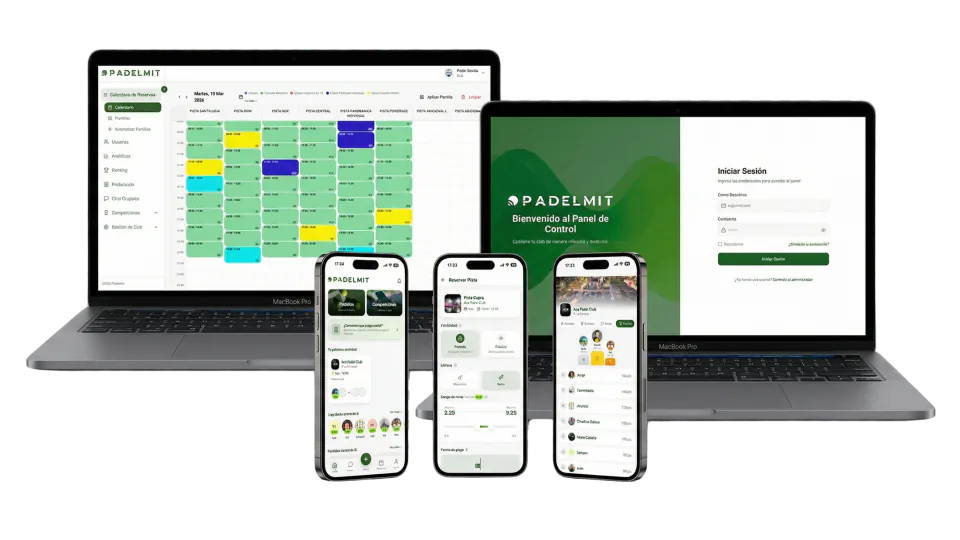
Automating what used to be done by hand without the people in charge losing control is what this topic shares with Padelmit. Many padel clubs were run through WhatsApp groups, scattered tools and manual processes. We built an app for players and an admin dashboard from which the club manages players, organises events, keeps track of activity and checks participation statistics.
First, a single bank account
Andrés does not need to connect all his accounts on day one. His first version would be the account where the takings from both card machines land: for a month, the tool only reads, suggests which transaction matches which payment and shows him the supporting record, and he approves or corrects each match. If it works, the suppliers' invoices come next month, starting with the mill.
If you would like to see how it would work for you, we walk you through it step by step (in Spanish).
Frequently asked questions
What is ChatGPT for Accounting?
It is a set of tools OpenAI launched on 18 November 2026: an accounting plugin for ChatGPT and plugins from software such as QuickBooks, Xero and NetSuite, among others. According to OpenAI, it drafts entries from invoices, reconciles the bank, looks for possible duplicates and writes month-end reports, always with a person reviewing before anything is approved.
Can AI do my business's bookkeeping on its own?
That is not what OpenAI is proposing. Its own page asks you to review the supporting records, calculations and suggested coding before approving any entry or report. AI can take on the repetitive part, such as matching transactions to invoices, but a person makes the final call. It is also worth telling whoever does your books before you change anything.
What if my accounting software has no plugin?
OpenAI suggests using computer use, the feature that lets ChatGPT operate an application much as a person would. You can also have a bespoke connection built between your systems. Either way, the rule is the same: start with read-only access and have a person approve whatever the tool suggests.
Does OpenAI use accounting data to train its models?
According to OpenAI, data from ChatGPT Business and Enterprise is not used to train its models by default. The company adds that admins choose which apps are switched on, that each user connects their own accounts and that ChatGPT respects the permissions each piece of software already has. Even so, it is worth reviewing your workspace settings before connecting any data.
Sources
About digizone
digizone is a custom software development company founded in 2019, with offices in Barcelona and Cartagena (Spain). We design and build mobile apps, web applications, CRM/ERP systems and AI automation for startups, SMEs and enterprises. Meet the team

Other articles
Don't get left behind: if you want to keep up to date with the fast-moving technology sector, take a look at the following articles:

Muse Ember and the cost of an AI agent in your business
Meta launches Muse Ember, a small model for the tasks agents repeat. The cost of an AI agent is measured per finished task, not per token.
Read more »
An AI meeting assistant that joins the call
Anthropic launches Claude Meetings in beta: AI joins the video call, takes notes and logs tasks. What a small business should decide before inviting it.
Read more »
Your business listing in ChatGPT: what changes for SMEs
OpenAI now lets businesses claim their ChatGPT listing, correct their details and see how often they are mentioned. What to check before customers ask.
Read more »Contact us
Do you have any questions? Would you like to schedule a call or a meeting? We would be happy to address any concerns and start working with you. The perfect digital solution for your business is just around the corner.
Subscribe to the newsletter
Discover the digital future by subscribing to our exclusive newsletter! Stay updated on the latest trends and developments in the world of technology. Don't miss the chance to be the first to learn about the innovations that are transforming the present! Subscribe now.