
Build an app with Claude: test it before you rely on it
Claude can now install what it builds as Mac and Windows apps, in beta. Use it to test an idea in real use before your business comes to rely on it.

Blog · · 6 min · digizone team
You can now build an app with Claude and keep it on your desktop: since 24 November, Anthropic lets you install what Claude builds in its artifacts, the interactive tools that appear next to the chat, as a Mac or Windows app. For a small business it is a quick way to test an idea in real use, as long as nobody mistakes a test for software the daily work depends on.
In short
- On 24 November Anthropic announced, in beta and on all plans, that what Claude builds in its artifacts can be installed as a Mac or Windows app.
- Each installed app opens in its own window, uses the Claude account of whoever installs it, needs a connection and a signed-in session, and its requests to Claude count towards the plan's limits.
- There are three permission levels; Anthropic does not review apps before they are installed and asks you to give full computer access only to apps you trust.
- The useful approach is to treat it as a test: one task, basic permissions and a couple of weeks noting what actually gets used before the business relies on it.
What Anthropic has launched
The feature is called “Install as app” and, according to Anthropic's announcement, it is in beta in Claude for Mac and Windows, on all plans. On the Team plan it is switched on, with full computer access switched off; on Enterprise, an owner in the organisation has to turn it on. You describe the app, try it as an artifact and click “Install as app” in the Share menu. There is no packaging or signing, and it uses the Claude account of whoever installs it, with no keys or separate login.
As MacRumors reports, the installed app opens in its own window and shows up in the Mac Dock. Anthropic adds that it can use Claude and the account's connectors, send notifications and update itself when the artifact is edited. There are three permission levels: the default, which only allows what it could do in a browser; app permissions, such as always-on-top windows, keyboard shortcuts or notifications; and full access, which lets it run programs and read, change or delete files without asking each time. Full access can only be given to apps you made or, on Team and Enterprise, apps made by someone in your organisation. After every change it asks for permission again. To open it you need a connection and to be signed in to Claude, and its requests to Claude count towards the plan's usage limits.
Irene's front-desk notebook

Imagine Irene runs an eight-room rural guesthouse. Every morning she checks the bookings on the front-desk laptop and copies into a notebook who is arriving, which rooms need making up and how many breakfasts to prepare. One day she describes a board for all that to Claude, tries it in the chat and installs it as an app on that same laptop, which stays signed in to her Claude account and online. With basic permissions, she types in each morning's arrivals and the board does the rest.
She also asks for a notes section for each guest, a birthday reminder and a towel count. A week later she realises she only ever opens two things: breakfasts and the rooms to make up.
Why do so many home-made tools end up in a drawer?
Because they are designed around what might be needed, not what gets done every day. People who run a small business know their work inside out, but when they picture a tool they tend to ask for too much: a section just in case, a report that might come in handy one day. What really gets used only shows up once you use it.
An app nobody opens still costs you

When an idea goes straight into development, that lesson arrives too late: the money and the weeks have already gone on screens nobody touches. The opposite carries a risk too. A test that works sticks around, the team starts counting on it and, without anyone deciding it, the business comes to depend on something that opens with one person's account, needs a connection and changes every time someone edits it.
Then there are the permissions. Anthropic warns that it does not review apps before they are installed and asks you to give full access only to apps you trust. An app with that level can read, change or delete files without asking.
How can you test an app built with Claude before relying on it?
The idea is to treat it as what it is: a test that shows you what you need. These steps help:
- Describe one task you repeat every day, not your whole business.
- Install it with basic permissions. If it asks for more, think about whether it really needs them.
- Use it for a couple of weeks and note which parts you open and which you never touch.
- Read what it asks for after each change before you accept again.
- Ask yourself what would happen if it did not open tomorrow: if your business would grind to a halt, it is no longer a test.

That list of what gets used is the most valuable thing the test leaves you with. It helps you decide whether the Claude app is enough, whether it is worth improving or whether the time has come to build something that does not depend on a personal account.
From a test to an app for the whole team, with digizone
At digizone we start by understanding your business: what you want to achieve, who will use the tool and how each person works today. With that, and with whatever a test like Irene's has taught you, we build the solution you need, with its own users, its data where it belongs and a team that maintains it. It is what we do in web app development.
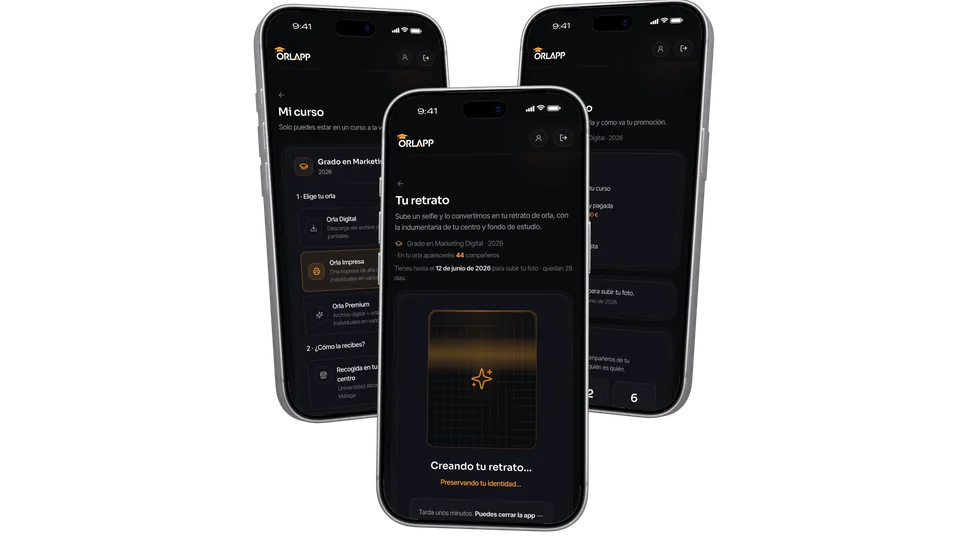
An app that installs on the device, with a different part for each kind of user, is what links this topic to Orlapp. For its graduation class composites we built an installable PWA, a website that saves to your phone like an app, for students, and web dashboards for schools and for the team that produces and delivers the composites.
First, tomorrow's breakfasts
Irene's first version is the one she already uses: a board with breakfasts and the rooms to make up. The day the person who cleans the rooms needs to see it on their phone, without Irene's account, she will know the test has done its job and it is time for the next step.
If you would like to see how it would work for you, we walk you through it step by step (in Spanish).
Frequently asked questions
What is Claude's “Install as app”?
It is a feature Anthropic announced on 24 November 2026, in beta and on all plans of Claude for Mac and Windows. It lets you install an artifact, an interactive tool Claude builds next to the chat, as an app with its own icon and its own window. It uses the Claude account of whoever installs it and updates itself when the artifact is edited.
Do I need to know how to code to build an app with Claude?
According to Anthropic, you describe the app to Claude, try it as an artifact and click “Install as app” in the Share menu, with no packaging or signing. What matters is describing the task well. It is best to start with one task you repeat every day and use it for a while before asking for more features.
Is it safe to give an app full computer access?
Anthropic does not review apps before they are installed and asks you to give full access only to apps you trust. At that level, an app can run programs and read, change or delete files without asking each time. The sensible approach is to start with basic permissions, which only allow what a browser could do, and read what it asks for after each change.
Does the app work offline or without my account?
No. According to Anthropic, to open an installed app you need a connection and to be signed in to Claude, and the requests it makes to Claude count towards the plan's usage limits. That makes it a good fit for a test, but if the whole team starts relying on it every day, it is worth considering a tool of your own.
Sources
About digizone
digizone is a custom software development company founded in 2019, with offices in Barcelona and Cartagena (Spain). We design and build mobile apps, web applications, CRM/ERP systems and AI automation for startups, SMEs and enterprises. Meet the team

Other articles
Don't get left behind: if you want to keep up to date with the fast-moving technology sector, take a look at the following articles:

AI for accounting: ChatGPT drafts and you approve
OpenAI has launched ChatGPT for Accounting to draft entries, reconcile the bank and close the month. First, decide what a person reviews and signs off.
Read more »
Muse Ember and the cost of an AI agent in your business
Meta launches Muse Ember, a small model for the tasks agents repeat. The cost of an AI agent is measured per finished task, not per token.
Read more »
An AI meeting assistant that joins the call
Anthropic launches Claude Meetings in beta: AI joins the video call, takes notes and logs tasks. What a small business should decide before inviting it.
Read more »Contact us
Do you have any questions? Would you like to schedule a call or a meeting? We would be happy to address any concerns and start working with you. The perfect digital solution for your business is just around the corner.
Subscribe to the newsletter
Discover the digital future by subscribing to our exclusive newsletter! Stay updated on the latest trends and developments in the world of technology. Don't miss the chance to be the first to learn about the innovations that are transforming the present! Subscribe now.