
Gemini skills: write down once how your team works
Google is replacing Gems with skills, saved instructions Gemini reuses with a slash. They are a chance to write down how your best person does the job.

Blog · · 6 min · digizone team
Gemini skills, saved instructions you reuse by typing a slash and their name, are reaching Google Workspace business accounts: their apps from 5 October and the Gemini app from 13 October. Google is positioning them as the replacement for Gems. For a small company, the news goes beyond AI: it is a good excuse to write down how the team handles the tasks it repeats every week.
In short
- Google announced on 30 September 2026 that skills, saved instructions you reuse by typing a slash and their name, will replace Gems in Gemini.
- According to Google, in Workspace accounts they reach the apps from 5 October and the Gemini app from 13 October; for now they do not sync between the two.
- In Workspace business accounts, Gems will stop working no sooner than 1 March 2027, and any that remain will become draft skills.
- For a small business, the opportunity is to write down how its best person handles a recurring task and turn it into an instruction the whole team can use.
What Google has announced
Google announced it on 30 September. A skill is a set of instructions you write once and Gemini applies whenever you call it up: how you want a newsletter drafted, say, or the tone you use with customers. To use one, you just type a slash and its name in the chat. You can combine several in a single request, such as a writing-style skill with a brand-guidelines one, and, according to Google's blog, they can include reference files as text, PDFs or images. Android Headlines adds that Gemini can spot prompts you keep repeating and offer to turn them into a skill.
The rollout is happening in stages: in the Gemini app for personal accounts it began on 30 September, and for business accounts Google expects to finish by mid-November. In Workspace it covers the Business and Enterprise editions, among others, for users aged 18 and over. Skills use SKILL.md, an open format based on Markdown (plain text with simple formatting marks), so a skill built on another platform can be copied across. For now they do not sync between the Gemini app and the Workspace apps: if you want one in both places, you have to create it in each. In business accounts, Gems will stop working no sooner than 1 March 2027, and any that remain will be turned into draft skills.
Lucía's notebook

Imagine you run a small travel agency with four people behind the counter. Lucía has been there longest and has her own way of putting a proposal together: first she asks about the real budget, then about the pace of the trip, and she never sends an itinerary without a plan B for a rainy day. All of it lives in her head and in a notebook with dog-eared corners.
For a few months now, the team has been using Gemini to draft proposals. Everyone prompts it their own way and everyone gets something different. Lucía's come out well because she knows what to ask for. One Tuesday in October, while Lucía is on holiday, a family walks in in a hurry and a colleague asks Gemini for a trip to Lisbon. The result is fine, but it looks nothing like what the agency usually sends.
Why does know-how stay in one person's head?
The scene is made up, but plenty of businesses will recognise it. In a small company, processes are not written down: people learn them by watching. That works as long as the person who knows is around. Nobody has time to write a manual, and when one finally gets written, it ends up in a folder nobody opens.
Something similar has happened with AI. The tools arrived without shared rules, and each person has built up their own prompts, which live in their chat history. The business's knowledge is still scattered, only now some of it sits in conversations nobody else sees.
The cost of everyone doing it their own way

That cost never shows up on an invoice, but you feel it. Proposals change depending on who signs them, and customers notice. New starters take weeks to pick up what everyone else takes for granted. And when the key person goes on holiday, or leaves for good, part of the way the business works walks out with them.
Skills will not fix this on their own, but they change the starting point. What used to be a manual forgotten in a folder can now be an instruction the tool applies every time someone calls it up.
How do you turn a recurring task into a Gemini skill?
There is no need to start with the whole business. One task that comes up every week and turns out differently depending on who does it is enough:
- Pick that task: a proposal, a reply to a complaint, a weekly summary for a client.
- Sit down with whoever does it best and note their steps and judgement calls in their own words: what they ask first, what is never missing, what tone they use.
- Add one or two good examples and the documents they rely on as reference, leaving out customers' personal data.
- Save it as a skill, try it on three real cases and fix whatever goes wrong.
- Decide who keeps it up to date and whether you need it in the Gemini app, in Workspace or in both, because for now it has to be created in each.

The most valuable part of the exercise is the text you write, and that text is yours: it is in an open format, so you can take it with you if you ever switch tools. One habit is worth keeping, too: whatever the AI prepares, a person checks before it reaches the customer.
How we help at digizone
At digizone we help companies get their processes in order and, when a general-purpose tool falls short, we build custom software that fits the way they work: from automating a recurring task to building an in-house assistant with the business's rules built in.
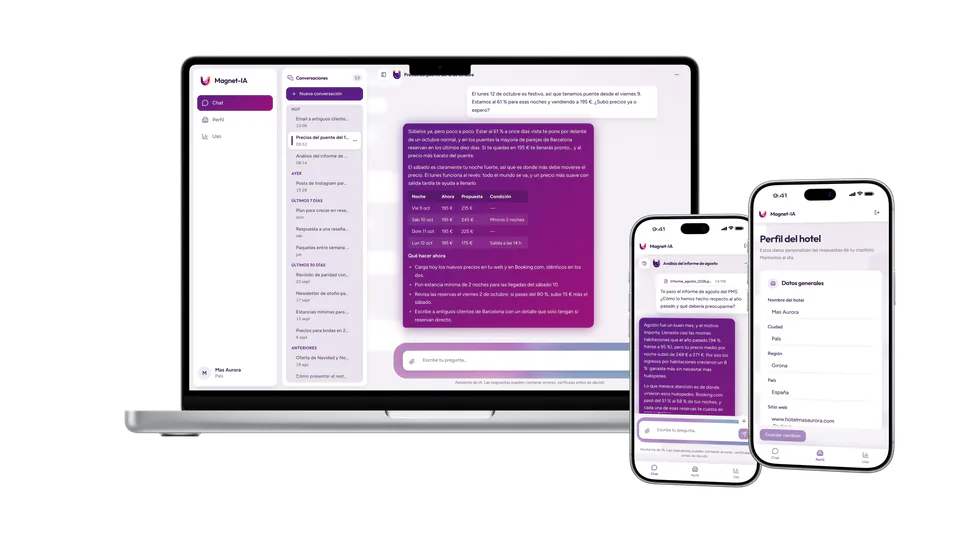
One example is Magnet-IA. The idea was to give boutique and independent hotels access to the judgement of a consultancy specialising in hotel revenue management (pricing and occupancy) and marketing. We built a copilot in which the AI answers using each hotel's real data, analyses its reports and suggests concrete actions in plain language. With every message, the agent stacks three layers: the global instructions, the hotel's profile and a set of adjustments only Magnet-IA can see, which it can fine-tune from a dashboard without touching any code. It is the same idea as skills, built into a product of its own.
Start with the task you repeat most
At Lucía's agency, the first version would be a single skill: the one for preparing trip proposals, written with her, tested on a week's worth of requests and corrected wherever it fell short. If it works, the next one could cover changes and cancellations. That is the idea behind an MVP, a minimum viable product: start with something small that already solves a real problem and let it grow with use.
If you would like to see how it would work for you, our free workshop, in Spanish, walks through it step by step.
Frequently asked questions
What is a Gemini skill?
It is a set of instructions you write once and Gemini applies whenever you call it up by typing a slash and its name in the chat. It suits recurring tasks, such as drafting proposals or replying to customers in a particular tone. You can combine several in one request and, according to Google, they can include reference files as text, PDFs or images.
What happens to the Gems I already have?
Google will turn them into skills. In Workspace business accounts, Gems will stop working no sooner than 1 March 2027, and any that remain will be migrated automatically as draft skills in the Gemini app. For personal accounts, the phase-out starts in November 2026. You can also recreate them by hand as skills before those dates.
Do I have to create the same skill in Gemini and in Workspace?
For now, yes. Google says skills do not sync between the Gemini app and the Workspace apps, so a skill you want to use in both places has to be created in each. In Workspace there is also a skill builder in Google Docs, designed for drafting skills and sharing them with your team.
Which task should I turn into a skill first?
The one that comes up every week and turns out differently depending on who does it: a sales proposal, a reply to a complaint or a summary for a client. Write it with the person who handles it best, test it on real cases and refine it. Keep customers' personal data out of the instructions and reference files, and always check the result before sending it.
Sources
About digizone
digizone is a custom software development company founded in 2019, with offices in Barcelona and Cartagena (Spain). We design and build mobile apps, web applications, CRM/ERP systems and AI automation for startups, SMEs and enterprises. Meet the team

Other articles
Don't get left behind: if you want to keep up to date with the fast-moving technology sector, take a look at the following articles:

ChatGPT watermark in the EU: what it means for your firm
OpenAI is adding an invisible watermark to ChatGPT text in the EU. Why what matters for your business is who checks what you publish, not the mark itself.
Read more »
Meta's new AI agent for small businesses needs your data
Meta has launched Muse for Small Business, an AI agent that reads a company's own tools. Why well-organised business data matters more than the agent itself.
Read more »
Only 4.1% of Spain's industrial SMEs use AI: how to start
The IndesIA Barometer 2026 finds that just 4.1% of Spain's industrial SMEs use artificial intelligence. What it means and where to start.
Read more »Contact us
Do you have any questions? Would you like to schedule a call or a meeting? We would be happy to address any concerns and start working with you. The perfect digital solution for your business is just around the corner.
Subscribe to the newsletter
Discover the digital future by subscribing to our exclusive newsletter! Stay updated on the latest trends and developments in the world of technology. Don't miss the chance to be the first to learn about the innovations that are transforming the present! Subscribe now.